Remote Jobs on LinkedIn: A Step-by-Step Guide to Get Hired Fast 💼
Remote jobs have become a huge trend since COVID-19, with many major companies now offering work-from-home options to their employees. While some people misused this opportunity, many others learned valuable skills and secured great jobs.
Today, WealthyWeb will show you how to find genuine remote jobs on LinkedIn — without falling for scams or wasting your time.
What Are Remote Jobs?
Remote jobs are employment opportunities that allow professionals to work from anywhere without being tied to a physical office. Unlike traditional 9-to-5 jobs that require daily commuting, remote jobs offer flexibility, location independence, and work-life balance.
Whether you’re looking for work-from-home jobs, freelance opportunities, or full-time remote positions, the core idea remains the same — you deliver results from a location of your choice using digital tools and online communication.
Key characteristics of remote jobs include:
-
No daily commute
-
Flexible working hours
-
Location independence
-
Digital collaboration
-
Often global opportunities
Ready? Let's Start Finding Remote Jobs
1. Create Your LinkedIn Account to Find Remote Jobs
To begin your remote job search on LinkedIn, the first step is creating your account.
How to Sign Up:
-
Open LinkedIn in your web browser, or
-
Download the LinkedIn mobile app from the Google Play Store (for Android) or Apple App Store (for iPhone)
Registration Process:
-
Sign up using your Gmail ID or phone number
-
Enter the basic details LinkedIn requires, including:
-
Full name
-
Address / Location
-
Gender
-
Current job title or employment status
-
Filling out these details correctly helps LinkedIn’s algorithm suggest relevant remote jobs, connect you with recruiters, and personalize your job feed.
Step 2: Set Your Remote Work Preferences
LinkedIn has thousands of remote job opportunities across various fields. To find the right one, you need to tell LinkedIn what kind of remote work you’re looking for.
Popular Remote Jobs on LinkedIn:
-
💻 Web Developer – Build websites and applications
-
📈 SEO Specialist – Help websites rank on Google
-
🔧 Web Engineer – Technical website development
-
👥 Recruiter – Hire people for companies remotely
-
📞 Customer Support – Help customers with queries
-
💬 Online Chat Support – Handle live chat conversations
-
✍️ Content Writer – Write articles and blog posts
-
🗂️ Virtual Assistant – Manage tasks and schedules
-
📱 Social Media Manager – Handle social media accounts
-
📊 Data Entry Specialist – Manage and enter data
How to Set Your Preferences:
-
Open your LinkedIn profile
-
Click the “Open to” button (below your profile photo)
-
Select “Finding a new job”
-
Fill in your job preferences:
-
Job titles – Add roles like “Web Developer”, “SEO Specialist”, etc.
-
Job type – Select “Remote”
-
Locations – Add cities or countries you’re open to
-
-
Click “Save”
3. Search and Apply for Remote Jobs on LinkedIn
Now comes the most important part — actively searching and applying for remote jobs on LinkedIn.
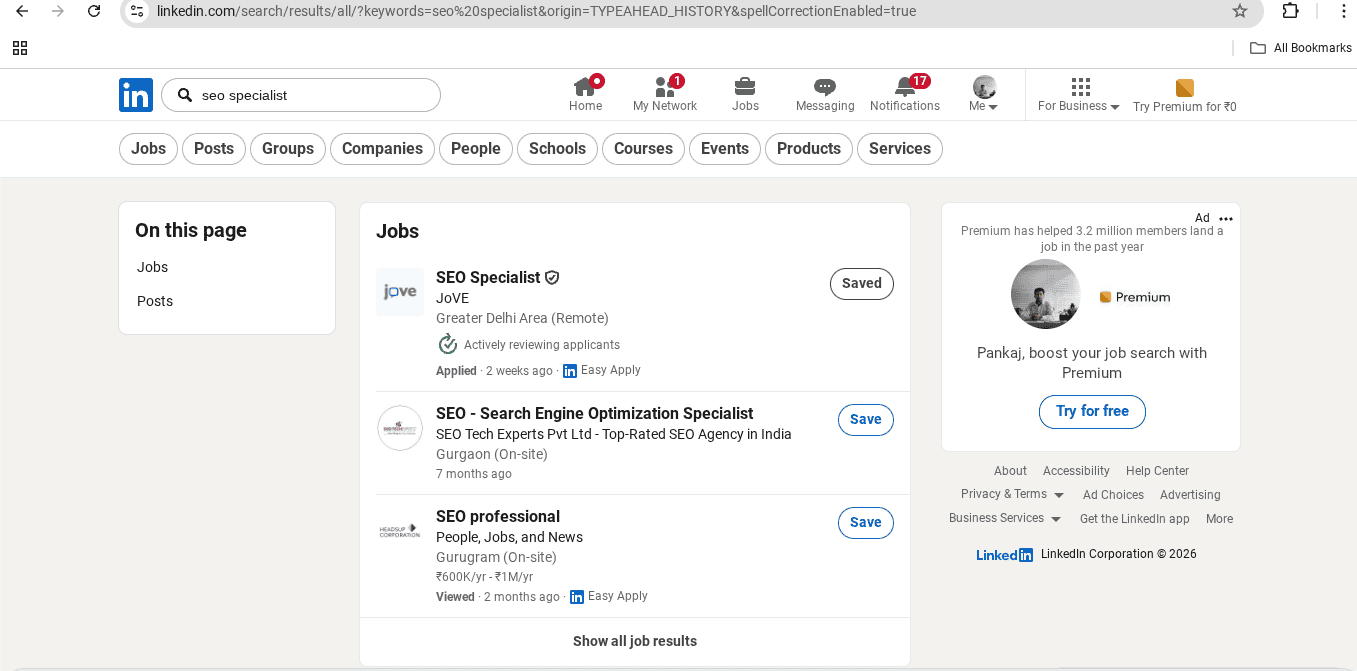
Step 1: Use the Search Bar
Click on the search icon (magnifying glass) at the top of your LinkedIn dashboard. In the search box, type your desired job role. For example:
“SEO Specialist”
“Remote Web Developer”
“Customer Support Remote”
Step 2: Navigate to Jobs Section
After searching, you’ll see multiple tabs. Click on the “Jobs” tab to view only job postings. You can also check the “Posts” tab, where recruiters and hiring managers often share job openings directly.
Step 3: Apply for Jobs
When you find a job that matches your skills:
Easy Apply: Click the blue “Easy Apply” button to submit your application instantly using your LinkedIn profile
External Apply: Click “Apply” to visit the company’s website, where you can apply via email or an online application form
⭐ Pro Tip – The 24-Hour Rule for Higher Success Rate
Always apply to jobs posted within the last 24 hours.
Here’s why this matters:
Recruiters receive 100+ applications for remote jobs within the first few days
Most candidates are shortlisted within the first 48 hours
Applying early puts your application at the top of the list
How to Filter by “Past 24 Hours”:
After searching for your job role, click “Filters”
Scroll to “Date posted”
Select “Past 24 hours”
Click “Apply”
Now you’re only seeing the freshest opportunities — giving you the best chance to get hired!
📍 BONUS: Avoid Remote Job Scams ⚠️ Never pay to apply ⚠️ Never share OTP/bank details ⚠️ Too high salary + no interview = RED FLAG ⚠️ Check company profile before applying Genuine remote jobs never ask for money upfront! --- 🎯 Your Action Plan for Today: ☐ Update LinkedIn headline ☐ Search "Remote [Your Role]" with filters ☐ Create job alert ☐ Follow 5 remote-friendly companies ☐ Apply to 3 jobs --- 💬 Still confused? Drop your question below! 👇 Which remote job role are you looking for? Let me know in comments — I'll share specific tips! --- ♻️ Repost if this guide helps you or someone in your network! 🔔 Follow for more remote job tips and opportunities.
Frequently Asked Questions About Remote Jobs
Q1. What exactly are remote jobs?
Remote jobs are employment opportunities that allow you to work from anywhere outside a traditional office. You can work from home, a coworking space, or while traveling. All you need is a laptop and a stable internet connection.
Q2. Are remote jobs on LinkedIn genuine?
Yes, LinkedIn has many genuine remote job opportunities. However, always verify the company profile, check if the recruiter has a legitimate profile, and never pay money to apply for a job.
Q3. Do I need experience for remote jobs?
Not necessarily. Many companies offer entry-level remote jobs for beginners. Roles like virtual assistant, data entry, customer support, and content writing often don’t require prior experience.
Q4. How can I find remote jobs on LinkedIn for free?
LinkedIn is completely free for job seekers. Simply create a profile, set your job preferences to “Remote,” use the search bar with your desired role, and apply using the “Easy Apply” option.
Q5. Why is applying within 24 hours important?
Recruiters receive hundreds of applications. Most hiring managers start reviewing applications within the first 24-48 hours. Applying early increases your chances of being noticed.
Q6. What are the highest-paying remote jobs on LinkedIn?
Highest-paying remote jobs include: Web Developer, SEO Specialist, Software Engineer, Data Scientist, Product Manager, and Digital Marketing Manager.
Q7. Can students apply for remote jobs?
Absolutely! Many companies hire students for part-time remote jobs, internships, and freelance roles. Popular options include content writing, social media management, and virtual assistance.
Q8. How do I avoid remote job scams on LinkedIn?
Never pay money to apply, never share OTP or bank details, check the company’s LinkedIn page, verify the recruiter’s profile, and be cautious of jobs promising extremely high salaries with no interview.
Q9. What skills are most in demand for remote jobs?
Most in-demand skills: Digital Marketing, SEO, Content Writing, Web Development, Customer Support, Social Media Management, Virtual Assistance, Data Entry, and Graphic Design.
Q10. Can I get a remote job without a degree?
Yes, many remote jobs don’t require a degree. Companies care more about your skills, portfolio, and experience than formal education.